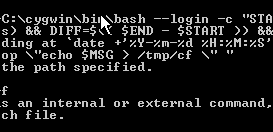
 While working on our backups today, I ran into a problem with the windows command interpreter which is so amazingly broken I felt compelled to write about it.
I want to provide a non-nerdy analogy that most people will get before I get into the super-nerdy stuff.
This behavior is the technical equivalent of having the following conversation with someone:
you: Hi, would you like an ice cream?
them: Yes, please.
you: What flavor: chocolate or vanilla?
them: Those are both made from beans.
The closest semantic analogy is a non-sequitur.
In technical terms, however...
The problem, in short: if you add a redirect (>, >> or |) to a command, that redirect will take precedence over any quotes on the command line.
witness:
C:\Users\Administrator>echo wtf > /tmp/cf

The system cannot find the path specified.
This is the expected error message when trying to redirect to a bad path on a windows system.
benjamin@backup-server:~$ echo no > /notmp/cf
-bash: /notmp/cf: No such file or directory
This is what the same error looks like on a unix system.
C:\Users\Administrator>C:\cygwin\bin\bash --login -c "ssh mybackups@backup-server \"echo hi ; hostname\" "
hi
backup-server
Here I am running an echo and hostname command both on the backup-server via an ssh connection from cygwin(the bash command shell) on the windows command prompt. As expected, it returns the text "hi", and the hostname of the server (which is backup-server since the command is running through ssh).
For the next example, I changed the commands being run via ssh from "echo hi ; hostname" to "echo hi > /tmp/cf". So instead of echoing "hi" to the screen and running the hostname command, it should echo "hi" into the file /tmp/cf
C:\Users\Administrator>C:\cygwin\bin\bash --login -c "ssh mybackups@backup-server \"echo hi > /tmp/cf \" "
The system cannot find the path specified.
But what do we get instead? The same "cannot find the path specified" error that we got above when we were trying to redirect output to a local file path.
WTF, Microsoft?
I can prove this behavior by changing the path to a valid local file path:
C:\Users\Administrator>C:\cygwin\bin\bash --login -c "ssh mybackups@backup-server \"echo wtf > local.txt \" "
C:\Users\Administrator>type local.txt
wtf
The > symbol negates TWO sets of nested quotes.
In mathematical terms, that would be like having an operator that completely ignores parenthesis and the rest of the PEMDAS rules.
We all know, thanks to PEMDAS, that (2 + 3) * 4 = 20 while 2 + 3 * 4 = 14.
If I add a ! (factorial) to the 4, it becomes: (2 + 3) * 4! = 120
but in Microsoft-world, (2 + 3) * 4! would be = 4! = 24
... which doesn't even really make sense, but that's how broken this is.
Inevitably, I ended up moving as much logic as possible into a cygwin shell script and doing the minimum possible in the windows command prompt environment. Probably what I should have done in the first place!